Digital Imaging
Provides a comprehensive practical guide to the entire digital chain, from capture -- with coverage of digital cameras, to output -- with extensive information on image adjustments and colour management.
 TABLE OF CONTENTS
 Before retouching and enhancement can take place the 'image size' must be adjusted for the intended output (scanning resolution will probably require changing to output resolution). Choose Image > Image Size. This will ensure that optimum image quality and computer operating speed is achieved. Image size is described in three ways:
pixel dimensions (the number of pixels determines the file size in terms of kilobytes).
print size (output dimensions in inches or centimetres).
resolution (measured in pixels per inch or ppi).
If one is altered it will affect or impact on one or both of the others, e.g. increasing the print size must either lower the resolution or increase the pixel dimensions and file size. The image size is usually changed for the following reasons:
Resolution is changed to match the requirements of the print output device.
Print output dimensions are changed to match display requirements.
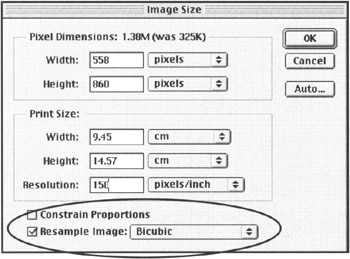
When changing an image's size a decision can be made to retain the proportions of the image and/or the pixel dimensions. These are controlled by the following:
If 'Constrain Proportions' is selected the proportional dimensions between image width and image height are linked. If either one is altered the other is adjusted automatically and proportionally. If this is not selected the width or height can be adjusted independently of the other and may lead to a distorted image.
If 'Resample Image'