Vegas Editing Workshop, Second Edition

Using Track FX

Every audio track in Vegas has a chain of FX installed on it already. A Noise Gate, EQ, and Compressor are found by clicking the FX button on each audio track. They can be heard during recording by using input monitoring, they can be removed from the track, or they can be appended to or replaced all together. These FX are optimized to keep processor resources at their peak but still place a load on the processor.

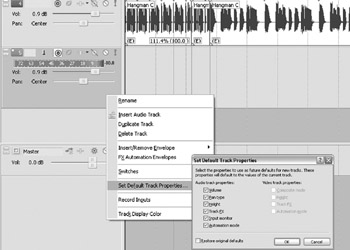
Set the default track properties by setting up the track the way you d like it to default to. Set up an FX chain for the track FX, right-click the Track Control pane, and select Set Default Track Properties. Checking the boxes in the dialog that opens will cause the current track settings to become the default settings for future tracks inserted into the current project. Now every time Vegas opens, these track settings become the default, saving time and preventing the user from having to remember how the last mix was set up before beginning.


Figure 5.27: Set the track defaults before recording so that all audio tracks have the same settings when inserted.
Tip

Set up a blank project with all track settings in place, so that when a project is started, a template of several tracks is already built. Starting with 8 to 16 tracks, complete with commonly used compressor, EQ, and reverb settings, not only saves time but also impresses clients when they hear how quickly a...

UNLIMITED FREE
ACCESS
TO THE WORLD'S BEST IDEAS

SUBMIT
Already a GlobalSpec user? Log in.

This is embarrasing...

An error occurred while processing the form. Please try again in a few minutes.

Customize Your GlobalSpec Experience

Category: Industrial Conveyors
Finish!
Privacy Policy

This is embarrasing...

An error occurred while processing the form. Please try again in a few minutes.