The Focal Easy Guide To Flash MX 2004: For New Users and Professionals
Chapter 3: Vector Drawing

Overview

What is vector drawing? It is a way to create and save digital imaging information. The edges are crisp, the colors are flat and the artwork you create is editable. In other words, you can go back to a graphic that you have created and easily modify its outline, color etc. Getting to know the drawing Tools and all the different mark making possibilities in the program is the first step towards developing your own original style in Flash.

The Drawing Tools

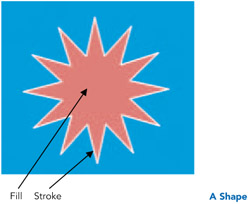
When you create a piece of artwork in Flash, it is known as a ' shape'. The outline is called the ' stroke' and the center is called the ' fill'.

Drawing a Line

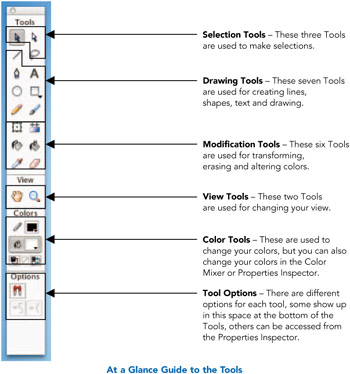
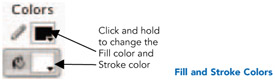
  1. You can create many different types of lines in Flash. After selecting the Line tool, you then choose the stroke attributes in the Toolbox, Properties Inspector or in the Color Mixer panel.

  2. Click and drag the line on the Stage. Click a second time to end the line.

  3. Holding down shift while you are dragging a line, constrains it to increments of 45 .

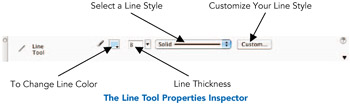
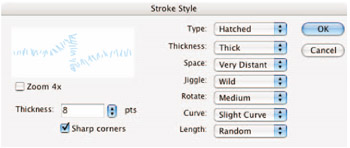
  4. When the Line tool is being used, you are able to access options for your line in the Properties Inspector as shown in the diagram above. Clicking on the Custom button opens the Stroke Style window, which gives you lots of different options to create lines with different textures.

  5. Explore and experiment with all the different line styles...

UNLIMITED FREE
ACCESS
TO THE WORLD'S BEST IDEAS

SUBMIT
Already a GlobalSpec user? Log in.

This is embarrasing...

An error occurred while processing the form. Please try again in a few minutes.

Customize Your GlobalSpec Experience

Category: Computer-Aided Design (CAD) Services
Finish!
Privacy Policy

This is embarrasing...

An error occurred while processing the form. Please try again in a few minutes.