The Focal Easy Guide To Flash MX 2004: For New Users and Professionals
An Online Portfolio

In the previous exercise, you completed a menu system that was contained within a movie clip.

Once this menu movie clip is on the Stage, you can use it to control events on the Stage:

  1. On the Stage, create a ' labels&actions' layer. Place new blank keyframes with labels at regular intervals for every single submenu item.

  2. Following on from the previous example you would need to create labelled keyframes for all of the following:

    • home,

    • web sites,

    • illustration,

    • graphics,

    • client list,

    • contact,

    • top 10,

    • flash tips.

  3. Add content to each of these frames for the submenu buttons to link to.

But how do you connect the buttons within the movie clip menu to labelled frames on the Stage? Don't they have different Timelines?

  1. Double click on your menu movie clip on the Stage to open it in Edit Symbol mode.

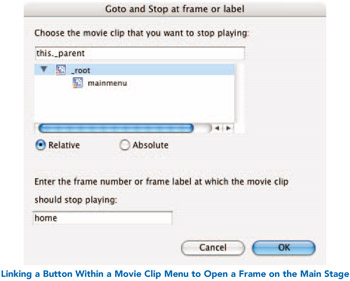
  2. Select the button in your menu that you want to link to a frame on the main Stage. Add the Goto and Stop behavior to it.

  3. Make sure _ root is selected as the movie clip and type in the name of the frame. This means that you will go to that frame on the main Stage.

UNLIMITED FREE
ACCESS
TO THE WORLD'S BEST IDEAS

SUBMIT
Already a GlobalSpec user? Log in.

This is embarrasing...

An error occurred while processing the form. Please try again in a few minutes.

Customize Your GlobalSpec Experience

Category: Cotter Pins and Wire Clips
Finish!
Privacy Policy

This is embarrasing...

An error occurred while processing the form. Please try again in a few minutes.