The Focal Easy Guide To Flash MX 2004: For New Users and Professionals
Chapter 9: More Animation Techniques

Using Motion Paths

A motion path is a drawing of the shape of the movement that you would like the symbol you are animating to take. You can draw these on guide layers in Flash. Guide layers can also be used to add lines and shapes that you are only using for layout and reference purposes. When you render your final movie, you won't see anything that has been created on a guide layer.

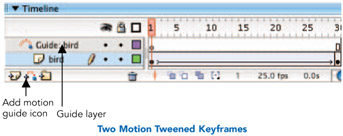
  1. Draw a shape that you would like to animate and turn it into a graphic symbol. Make sure that it is on it's own layer. Create a second keyframe in frame 30 and create some motion tweening between these 2 frames. You need to do this so that you have more than one keyframe to place on your motion path.

  2. Now to create a motion path. Make sure the layer you want to effect is selected. Select Insert > Timeline > Motion Guide or more simply click on the Add Motion Guide icon at the bottom of the timeline. This will create a new layer called Guide: (name of layer effected). The layer underneath, which will be effected by the motion guide, should be indented.

  3. A guide layer won't show up in your final movie. You could also use it to write little notes and reminders to yourself or your co-workers while you are working.

  4. Click on guide layer's name to make it active. Select the

UNLIMITED FREE
ACCESS
TO THE WORLD'S BEST IDEAS

SUBMIT
Already a GlobalSpec user? Log in.

This is embarrasing...

An error occurred while processing the form. Please try again in a few minutes.

Customize Your GlobalSpec Experience

Category: Industrial Winches
Finish!
Privacy Policy

This is embarrasing...

An error occurred while processing the form. Please try again in a few minutes.