The Focal Easy Guide To Flash MX 2004: For New Users and Professionals
An online portfolio is an excellent way to showcase your work. It should be easy to access information on it and for clients to view examples of your work.
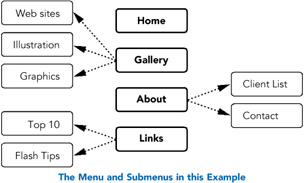
The following exercise will allow you to create a pop-up menu for an online portfolio with four basic sections:
Home on which your contact details are shown;
Gallery from which you can view images,
About which contains text about yourself,
Links a selection of your favorite links.
Each of these basic sections can be divided into further categories or 'submenus'. Create your own design concept and customize this basic structure to suit your own needs.

First of all, decide on the size that your overall site will have and the color scheme that you will be using and modify your document accordingly.
The aim is to create a site with a pop-up menu a menu in which subcategories pop up when you click on one of the main buttons. This whole menu will be placed in a movie clip symbol.
First create the generic buttons which will be used in the menu. Text will be added to them on the Stage later, so do not create any text within the button at this point.
Insert > New Symbol > Button and call it ' btnMain'. Design a plain button, without any text, which will be for the four main sections or the top...