The Focal Easy Guide To Flash MX 2004: For New Users and Professionals
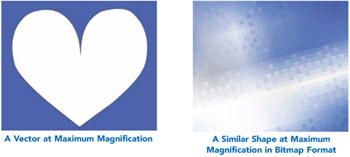
Computers store picture information in two different ways using vector or bitmap file formats.

When a bitmap file type is used, the computer divides the picture into a grid. You can see the squares on the grid if you zoom in very close to a bitmap image. These squares are known as pixels.
Bitmaps are good file types to use when you are working with very complex textures or photographs. However, the file sizes can be large and if your image is scanned or created with a low resolution to keep the file size down, you may get a pixilated image in which you can see the square outlines of your pixels.
Vector images, on the other hand, have very small file sizes. The computer uses geometry and mathematics to store the picture information.
Vector files are resolution independent. If you zoom in close to them, the outlines will remain crisp and perfect. They are good to use for graphics with blocks of color and gradients, but not so useful for complex textures.
Work produced in vector programs like Flash tend to have a particular 'look' about them. Get some texture into those clean looking vectors with the careful use of bitmaps.
Although Flash is a fantastic program to use for drawing, you may wish to bring in photographs or other types of images that you have created in software outside Flash.