Instant Encore 1.5

The First Project:

When using Encore for the first time, the interface is empty until a new project is created or opening an existing project takes place.

To open a new project:

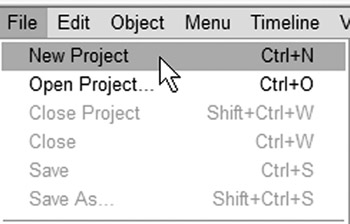
Go to File>New Project

Or use the keyboard shortcut Ctrl+N.

At this point Encore opens the New Project Settings dialog. This dialog determines the television standard on which the DVD will be played.

Choose NTSC for North America.

Choose PAL For Asia and Europe.

Click OK.

When you open a new project, the Project window is displayed. At this time, Encore is ready to import assets.

UNLIMITED FREE
ACCESS
TO THE WORLD'S BEST IDEAS

SUBMIT
Already a GlobalSpec user? Log in.

This is embarrasing...

An error occurred while processing the form. Please try again in a few minutes.

Customize Your GlobalSpec Experience

Category: Video Cameras
Finish!
Privacy Policy

This is embarrasing...

An error occurred while processing the form. Please try again in a few minutes.