MPEG-1 Layer II audio files can also be used, but this format is not widely supported by NTSC DVD players. If MPEG-1 files are imported into an NTSC project, they will be automatically transcoded to a NTSC DVD compliant AC-3 audio file. AC-3 is the best choice for player compatibility.
To import an MPEG-1 Layer II audio file:
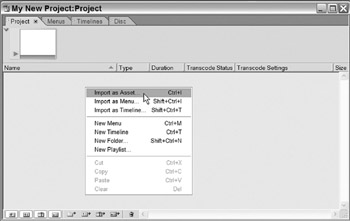
Right-click in the Project tab.
Select Import as Asset.
The keyboard shortcut Ctrl-I may also be used.
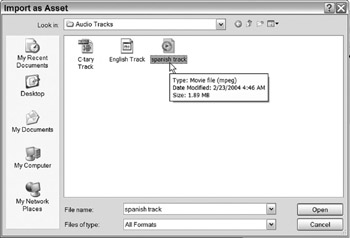
This opens the Import as Asset dialog.
Locate and select the desired MPEG-1 audio file(s).
Click Open.
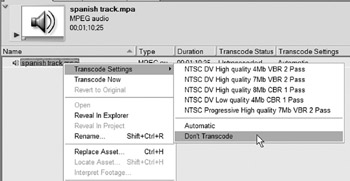
The MPEG-1 audio file has now been imported into the Project tab. Notice it has been set to Automatically Transcode.
If this is a PAL project, the Transcode Settings can be set to Don't Transcode.
| Note | AC-3 is almost always a better choice than MPEG-1 audio, unless the known target audience only has very old equipment to play back the project. All computers less than four years old that contain DVD players will play back AC-3 files. |
Important: This setting can be changed on an NTSC project, but most NTSC DVD players do not support MPEG-1 Layer II audio.
To retain MPEG-1 Layer II audio on a PAL DVD project:
Right-click on the MPEG audio file.
Go to Transcode Settings>Don't Transcode.
The MPEG-1 Layer II audio file will now be preserved on the final DVD.


 TABLE OF CONTENTS