PCM audio, or Pulse Code Modulation, is a common uncompressed audio format. It offers lossless fidelity to the original source. However, its file size is typically much too large for economical DVD authoring. When PCM is imported into Encore, by default it will automatically transcode the audio file into Dolby Digital AC-3 when building the disc. By doing this Encore creates more space for video assets.
To import a PCM audio file:
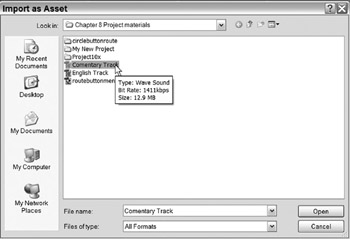
Right-click in the Project tab and select Import as Asset
Or use the keyboard shortcut Ctrl-I.
This opens the Import as Assets dialog.
Locate and select the PCM File(s).
You can select multiple files by holding the Ctrl key while clicking.
Click Open.
The audio files have now been imported into the Project tab.
| Note | Some older set-top DVD players will not properly play back PCM audio files. |
As mentioned before, PCM files are transcoded to AC-3 files by default. This is recommended because it compresses the audio file and allows the author to devote more available disc capacity to video. If you want the PCM format in the final product, then set the process to Don't Transcode. PCM files are DVD-legal and can be burned directly to disc without additional transcoding.
Important: The PCM file must be 48kHz and at 16- or 24-bit sample rate. Otherwise this option is not available.
To retain PCM audio in the final disc:
Right-click on the audio file.
Go to Transcode Settings>Don't Transcode.
The PCM file is...


 TABLE OF CONTENTS