Instant Encore 1.5

Chapter 4: Menus, Menus, Art and Function

Overview

If Timelines are the highways on a DVD, then Menus are the gateways to those roads. DVD menus offer perhaps the greatest advantages over VHS. With menus, a DVD's features may be seen and accessed instantly. Menu creation has become an art form of its own right with the use of spectacular backgrounds, motion transitions, video backgrounds and motion thumbnails.

Encore is supplied with professionally designed templates that can be put to use in minutes. This speeds the production process and allows a beginning author to quickly create professionally designed menus and buttons.

It is recommended that everyone, not just beginning authors, explore the templates included with Encore. The concepts learned from the templates will pay off dividends when creating menus from scratch.

Open an Existing Template

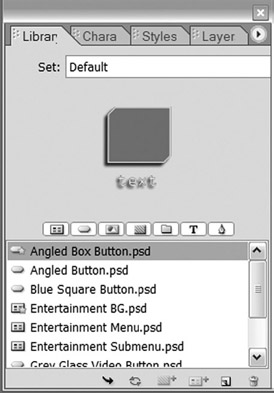
The first step in using templates is to open one of the menu templates. They are stored in the Library palette.

To open a template:

Note

Templates are a great way to get started in Encore. They can be used to help gather ideas for a project, and can be easily modified to cater to individual projects. A goodies folder, found in Encore's installation CD, provides additional templates and assets.

Open the Library palette.

The Library palette contains three kinds of Photoshop files: graphics, buttons, and menus. The menus in the Library palette contain backgrounds, buttons, text, and graphics. The menu templates all contain the word "menu" in their names. Submenus are generally used for chapter selection menus.

You can preview the...

UNLIMITED FREE
ACCESS
TO THE WORLD'S BEST IDEAS

SUBMIT
Already a GlobalSpec user? Log in.

This is embarrasing...

An error occurred while processing the form. Please try again in a few minutes.

Customize Your GlobalSpec Experience

Category: Media and Presentation Software
Finish!
Privacy Policy

This is embarrasing...

An error occurred while processing the form. Please try again in a few minutes.