Instant Encore 1.5

Change the Default Audio Encoding Scheme

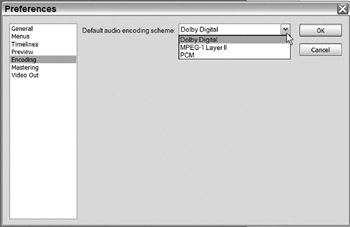
By default, Encore encodes non-Dolby Digital Audio into the Dolby Digital AC-3 format. Imported AC-3 files are automatically set to Don't Transcode. The AC-3 format is widely supported and is recommended for all projects. However this default scheme can be modified to PCM or MPEG-1 Layer II audio.

Changing the default audio encoding scheme only applies to audio files imported. after the scheme has been changed.

To change the default audio encoding scheme:

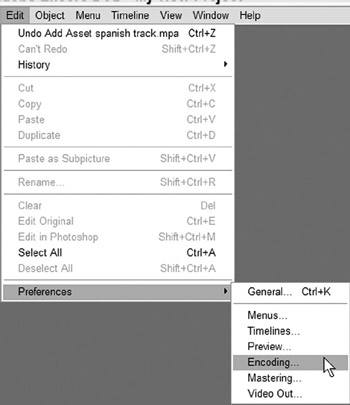
Go to Edit>Preferences>Encoding.

Click on the arrow next to the Default Audio Encoding Scheme.

Select the desired default audio format.

Click OK.

Now all audio files imported into Encore will be transcoded to new default audio format.

UNLIMITED FREE
ACCESS
TO THE WORLD'S BEST IDEAS

SUBMIT
Already a GlobalSpec user? Log in.

This is embarrasing...

An error occurred while processing the form. Please try again in a few minutes.

Customize Your GlobalSpec Experience

Category: Video and Audio Software
Finish!
Privacy Policy

This is embarrasing...

An error occurred while processing the form. Please try again in a few minutes.