Instant Encore 1.5

Chapter 3: Speak the Language Multi-Track/Multilingual Audio, Subtitles and Slideshows

One of the greatest but most overlooked features of a DVD is the capacity for multiple audio and subtitle tracks. This cuts production costs dramatically by giving one DVD a greater audience. Before DVD, companies had to release several different versions of a video in different languages. Other features such as 5.1 Dolby Digital sound, multiple audio tracks and multiple subtitle tracks take the viewer's experience to a whole new level.

In addition, a DVD offers the ability to create and display slideshows. These slideshows can display a collection of art, storyboards, or still photographs taken during production. The possiblities are limted only by your own imagination.

Import Audio into a Timeline

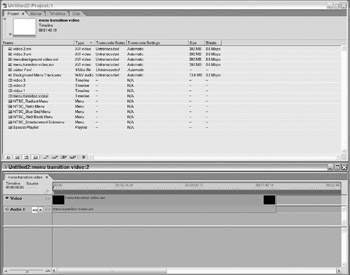
If you're working with AVI files or an encoder that produces program streams, the video and audio will be linked together and added to a timeline automatically. You'll have to manually add other audio tracks (elementary streams) designed to be used in conjunction with a separate video stream. This mainly applies to projects that rely on imported MPEG-2 video and a separate AC-3 audio stream.

Note

Encore 1.5 Tip: When creating a new timeline, you can create a timeline by simultaneously selecting a video and audio asset in the Project window and clicking the Create a New Timeline button. If the video file you selected contains audio, the audio file will be added as a second track in the timeline.

To add audio to a timeline:

With the Timeline window in view, select the audio file in the...

UNLIMITED FREE
ACCESS
TO THE WORLD'S BEST IDEAS

SUBMIT
Already a GlobalSpec user? Log in.

This is embarrasing...

An error occurred while processing the form. Please try again in a few minutes.

Customize Your GlobalSpec Experience

Category: Video and Audio Software
Finish!
Privacy Policy

This is embarrasing...

An error occurred while processing the form. Please try again in a few minutes.