An asset is anything imported to the project to use within the project. Nearly all DVDs have motion video as their main content, except in the case of slideshow discs. Encore 1.0 will import most Direct Show compatible video formats, with the exception of QuickTime.(.mov or .qt). QuickTime files are supported in Version 1.5. For DVD authors, MPEG-2 (.mpg, .m2v, .mpv) and AVI are the two most commonly used formats.
There are also restrictions depending on the television standard of the project.
NTSC video must have a frame size of 720x480, 720x486, or 704x480, and must have a frame rate of 23.976, 24, or 29.97 frames per second (fps).
PAL video must have a frame size of 720x576 or 704x576, and must have a frame rate of 25 fps.
There are three ways to import video assets:
Using the File menu
Using the Project window
Dragging from Windows Explorer
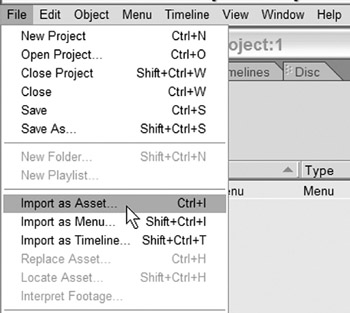
To import video assets using the File menu:
Go to File>Import as Asset
Or use the keyboard shortcut Ctrl-I.
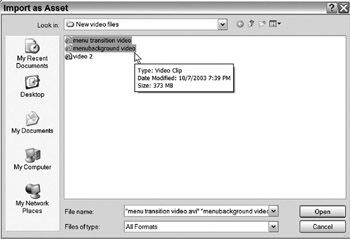
This opens the Import as Asset dialog.
Locate and select the video file(s).
Holding Ctrl while you click on files selects multiple files for import.
Click Open.
The files are imported into the Project window. Any unsupported files will not be imported.
The Project tab in the Project window lists all the major components of the project, such as menus, timelines, and assets. It provides a spreadsheet view of the materials, showing important information such as file size and...


 TABLE OF CONTENTS