The Focal Easy Guide to Macromedia Flash 8: For New Users and Professionals
Flash gives you the capability to go beyond the creation of vector graphics and add the element of interactivity and/or animation to them. One of the ways in which this is done is through the use of symbols.
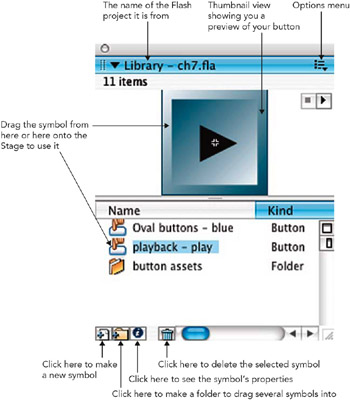
A symbol is a re-usable object that is saved in the Library panel. You can drag copies of it onto the Stage to use in your movie. A copy of a symbol used on the Stage is known as an instance of the original symbol.
There are two ways to create a symbol. As well as creating a symbol from the beginning with Insert > New Symbol and then creating some artwork, you can also select a piece of artwork on your Stage and choose Modify > Convert to Symbol.
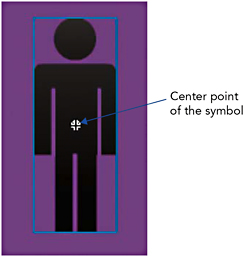
A Symbol Has a Blue Bounding Box Around It
You can tell that your artwork has been converted into a symbol because if you select it, it will have a blue bounding box and you can no longer use the Eraser, Ink Bottle or Paint Bucket tools on it or change the stroke and fill colors. You can no longer use the Lasso or Subselection tools to select small sections of this symbol, nor can you reshape the outline with the Arrow tool.
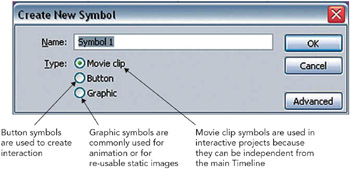
Create New Symbol Dialog Box with Dropdown Options
The Library
There are three types of symbols used in Flash: