The Focal Easy Guide to Macromedia Flash 8: For New Users and Professionals

Chapter 14: Putting Flash on the Web

Now that you have designed and produced a slick, all-singing, all-dancing Flash web site, what are the practicalities of organizing your site, adding the finishing touches and putting it on the web?

Project Management Tips

It doesn t take long for a seemingly simple project to become very complicated. You can end up with many different assets, objects and layers. The following tips will help you to organize your project efficiently:

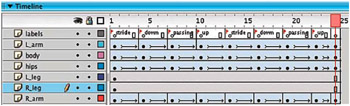
  1. Always name your layers after what is on them.


    In this Animation of a Character Walking, Each Layer is Named After the Body Part on it. Labels Have Been Added to Blank keyframes on a Layer in the Timeline to Mark Key Stages in the Walk Cycle

  2. Create a Labels layer and add comments to remind you of key stages in your animation.

  3. If you are using lots of layers, simplify your Timeline by using layer folders.

  4. If you forgotten which layer an object is on, turn the visibility on and off by clicking on the eye icon on the layer for all of your layers until you find the correct one.

  5. Keep your Library tidy and keep your assets in obviously named folders.

  6. If you have more than one Flash project open you can add a Library item from one project into the other. Flash will add it to the Library of your current file.

  7. At the end of your project, choose Library > Options > Select...

UNLIMITED FREE
ACCESS
TO THE WORLD'S BEST IDEAS

SUBMIT
Already a GlobalSpec user? Log in.

This is embarrasing...

An error occurred while processing the form. Please try again in a few minutes.

Customize Your GlobalSpec Experience

Category: Protocol Stack Software
Finish!
Privacy Policy

This is embarrasing...

An error occurred while processing the form. Please try again in a few minutes.