The Focal Easy Guide to Macromedia Flash 8: For New Users and Professionals
Timeline Effects are prebuilt effects allowing you to easily create and duplicate animated text, graphic symbols, shapes and groups, imported bitmaps, button and movie clip symbols:
To apply a Timeline Effect, select the object you want to apply it to and then select the required Effect from the Insert menu.
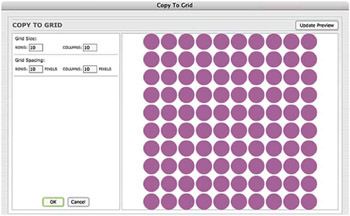
The Copy to Grid Effect, which Creates a Grid Out of the Shape You ve Selected
Insert > Timeline Effects > Assistants > Copy to Grid creates copies in the shape of a grid.
Update Preview allows you to see the changes that you have made to the Effect parameters.
Layers are Named after the Effect Applied
The settings are saved within a graphic symbol that can be found in your library with the rest of your symbols and imported bitmaps.
If you want to separate the grid into individual pieces, then choose Modify > Break Apart.
The New Graphic Symbols are also named after the Effect
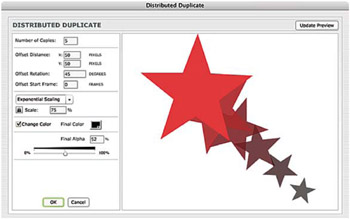
Insert > Timeline Effects > Assistants > Distributed Duplicate creates copies in a line, which can be rotated and have different colors applied.
Distributed Duplicate applied to a Star Shape
Insert > Timeline Effects > Effects > Blur is used to create an animated fade out.
Insert > Timeline Effects > Effects > Drop Shadow allows you to create a drop shadow. Entering positive numbers into the Shadow Offset boxes will place your shadow in...