Animation is the illusion of movement caused by a sequence of pictures changing rapidly over time. Due to a process known as the persistence of vision our eyes are tricked into seeing these still images as being in motion rather than as individual pictures.
To create animation with Flash you also create a series of still images on the Stage and change them over time to give the impression of movement. A change is recorded by a keyframe, so each time you move, redraw, rotate etc your drawings on the Stage you will need to create a keyframe to save all the different drawings in your sequence. You will then be able to play them back and see your drawings come to life.
There are two different ways to produce animation in Flash. The first is very intuitive. Frame-by-frame animation involves drawing each frame individually. In terms of traditional animation, this is like using Flash as your line tester. The second method may seem more complex, but once you have grasped the concepts of animating with tweening you will be able to save yourself a lot of time.
Creating a Banner Ad with Frame-By-Frame Animation
Frame-by-frame animation is the easiest way to animate in Flash. The first stage is to create the artwork that you want to animate.
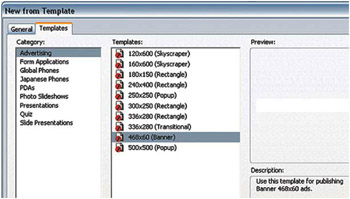 Creating a Document for a Web Banner with a Template
 You then separate the different elements onto different layers.
-
Start a new Flash Project. Modify
Copyright Elsevier Ltd. 2006 under license agreement with Books24x7


 TABLE OF CONTENTS