The Focal Easy Guide to Macromedia Flash 8: For New Users and Professionals
Interactive Buttons

Now, let s look at one of the types of symbols in more detail.

In Flash, a Button is a re-usable symbol that can trigger an action when it is clicked on. The action could be one of the following:

  • start to play or stop a sound;

  • jump to another frame;

  • play a new scene;

  • go to a web site.

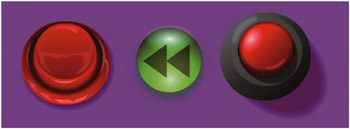
Button designs can take different forms. Here are some examples of button design themes:

  • Organizational They could relate to the organization of your site and have words on them so that the user is very clear about what the button does.

  • Functional They could relate to objects in the real world so that it is clear how they are used, for example looking like a play button or a doorbell.

  • Aesthetic Finally, button designs can be taken from the overall design theme and be small versions of a general motif.

If you go to Window > Common Libraries > Buttons, you will find many button files for you to experiment with.


Sample Buttons from the Common Libraries

UNLIMITED FREE
ACCESS
TO THE WORLD'S BEST IDEAS

SUBMIT
Already a GlobalSpec user? Log in.

This is embarrasing...

An error occurred while processing the form. Please try again in a few minutes.

Customize Your GlobalSpec Experience

Category: Spring Stops
Finish!
Privacy Policy

This is embarrasing...

An error occurred while processing the form. Please try again in a few minutes.