The Focal Easy Guide to Macromedia Flash 8: For New Users and Professionals
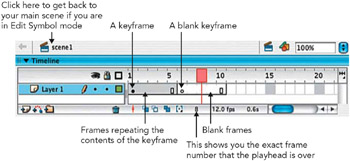
Keyframes are used to record changes over time.
When you insert a keyframe, you actually create a copy of the last keyframe on the layer. The contents can now be either deleted or used as the starting point for new artwork.
This is done by clicking on the Timeline into the frame in which you want to insert a keyframe and then selecting Insert > Timeline > Keyframe. You can also hit F6 on your keyboard or CTRL/RIGHT-CLICK on the frame and select Insert Keyframe from the menu.
If, instead, you choose Insert > Timeline > Blank Keyframe, you will insert a blank keyframe with nothing on it and you can start a completely new piece of artwork. The shortcut for this is F7.
If you want to hold on a keyframe for more than one frame without any changes taking place, then you don t need to insert any more keyframes, but to use frames instead. So, frames are used when you want to have a piece of artwork that is not changing at that point in time. To insert frames, click on where you want them to end on the Timeline and then choose Insert > Timeline > Frame or hit F5 on the keyboard.