The Focal Easy Guide to Macromedia Flash 8: For New Users and Professionals
Chapter 2: Interface

Flash 8 has interface elements that are common to all Macromedia web and multimedia authoring products. So, once you are familiar with one of the Macromedia programs, you will be on your way to understanding the others.


Start Page

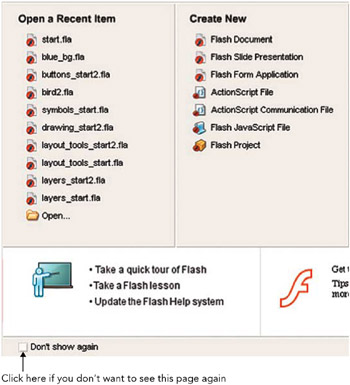
The Start Page

  1. The Start Page allows you to quickly access files and create new items. When you first begin to use the program it is worthwhile spending some time taking the quick tour of Flash and taking some of the in-built Flash lessons, which you can access from this page.

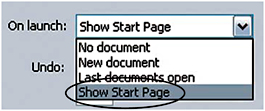
  2. If you don t want to see this page again, click in the check box to select Don t show again. If you want to make sure that this page will open each time you open Flash, you need to select this in the preferences. To do this on a Mac, go to Flash > Preferences > On launch > Show Start Page.


    Preferences. Circle Indicates Show Start Page

  3. To do this on a PC, go to Edit > Preferences > On Launch > Show Start Page.

At a Glance Guide to the Interface


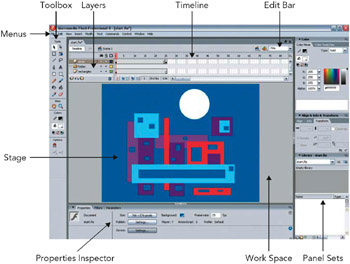
The Interface at a Glance

Menus Just as in any other software program, access different parts of the software by choosing from the menus at the top of the screen.

Stage This is where you create and view your design work.

Workspace The gray area off the edge of the Stage that won t...

UNLIMITED FREE
ACCESS
TO THE WORLD'S BEST IDEAS

SUBMIT
Already a GlobalSpec user? Log in.

This is embarrasing...

An error occurred while processing the form. Please try again in a few minutes.

Customize Your GlobalSpec Experience

Category: Graphic Design Services
Finish!
Privacy Policy

This is embarrasing...

An error occurred while processing the form. Please try again in a few minutes.