Adobe Photoshop Elements 3.0: A Visual Introduction to Digital Imaging

For those users who are a little familiar with both selections and layers, it might seem a bit strange to group these features together, but to my mind they both deal with a similar idea isolating specific sections of an image to make them easier to manipulate. They also represent two Elements features that are central to many advanced manipulation and enhancement techniques.
Until now, we have assumed that any changes being made to an image will be applied to the whole of the picture, but before too long it will become obvious that there are many imaging scenarios that would benefit from being able to restrict alterations to a specific part of a picture. For this reason, most image-editing packages contain features that allow the user to isolate small sections of an image that can then be altered independently of the rest of the picture.
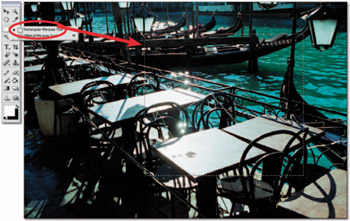
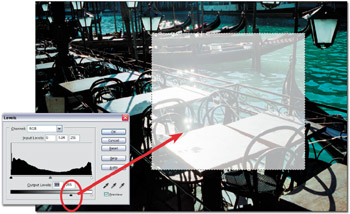
When a selection is made, the edges of the isolated area are indicated by a flashing dotted line, which is sometimes referred to as the 'marching ants'. See Figure 6.1. When a selection is active, any changes made to the image will be restricted to the isolated area. See Figure 6.2. To resume full image-editing mode, the area has to be Deselected (Select > Deselect).