Adobe Photoshop Elements 3.0: A Visual Introduction to Digital Imaging

Chapter 13: Theory into Practice: Real Life Elements Projects

Now that you have an understanding of the program and many of its great features use the following projects to build your skills. You can download all the resources you need to complete the tasks from the book's website (www.guide2elements.com) and once you are feeling confident you can move onto the next step and start to substitute your own pictures for the ones I supplied.

Project 1: Slide Shows from Your Home Videos

Skill Level-1
Version-3.0, 2.0

The new range of digital video cameras has made the process of capturing and using frames from your home movies easier than ever. As the data is actually stored in a digital format there is no longer the need to buy expensive capture cards when you want to feature a few moments from your latest cinematic efforts. Elements 3.0 is particularly well suited to this task as you can not only grab the 'Frame From Video' (Editor: File > Import > Frame From Video) but you can also compile the captured still moments in a self-contained slide show created using the Slide Show feature (Browser: File > New > Slide Show).

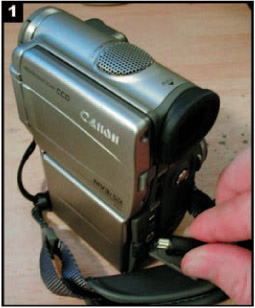
Attach your video camera to your computer and download a few segments of footage to your hard drive using the capture software supplied with the camera.

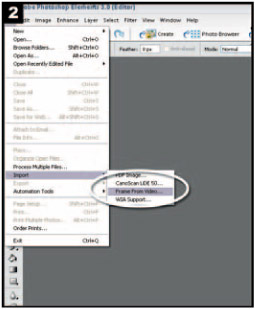
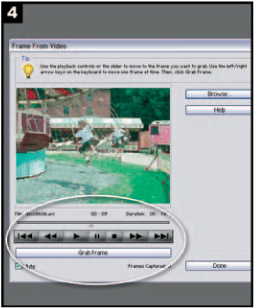
Select Editor: File > Import > Frame From Video to open the Elements video capture dialog.

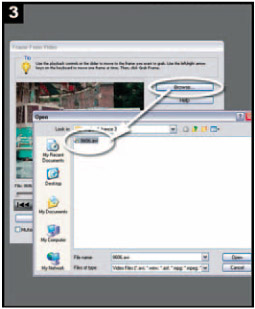
Click the Browse button and search for your video files.

Use the VCR type buttons to navigate the video clip...

UNLIMITED FREE
ACCESS
TO THE WORLD'S BEST IDEAS

SUBMIT
Already a GlobalSpec user? Log in.

This is embarrasing...

An error occurred while processing the form. Please try again in a few minutes.

Customize Your GlobalSpec Experience

Category: Frame Grabbers
Finish!
Privacy Policy

This is embarrasing...

An error occurred while processing the form. Please try again in a few minutes.