Adobe Photoshop Elements 3.0: A Visual Introduction to Digital Imaging

At some point during your imaging life you will need, or want, to create an image from scratch. Until now, we have concentrated on editing, adjusting and enhancing images that have been generated using either a camera or scanner; now we will look at how to use Elements' painting and drawing tools to create something entirely new.
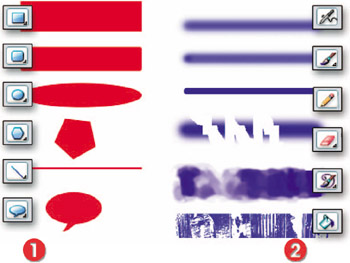
Although the names are the same, the tools used by the traditional artists to paint and draw are quite different from their digital namesakes. The painting tools (the Paint Brush, Pencil, Eraser, Paint Bucket and Airbrush) in Elements are pixel based. That is, when they are dragged across the image they change the pixels to the color and texture selected for the tool. These tools are highly customizable and, in particular, the painting qualities of the Brush tool can be radically changed via the brush More Options palette.
The drawing tools (the Shape tools), in contrast, are vector or line based. The objects drawn with these tools are defined mathematically as a specific shape, color and size. They exist independently of the pixel grid that makes up your image. They produce sharp-edged graphics and are particularly good for creating logos and other flat colored artwork. See Figure 8.1.
Also included in this vector type (hard-edged) drawing tool group is the new Cookie Cutter tool. Though not strictly...