Adobe Photoshop Elements 3.0: A Visual Introduction to Digital Imaging

Chapter 7: Combining Text with Your Images

Overview

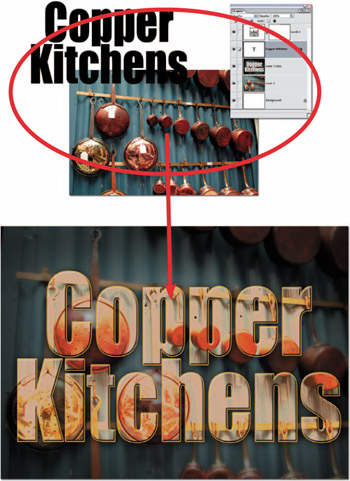
Digital imaging has blurred the boundaries between many traditional industries. No longer does the image maker's job stop the moment the illustration or photograph hits the art director's desk. With the increased abilities of software like Photoshop Elements has come the expectation that not only are you able to create the pictures needed for the job, but you will also be able to perform other functions like adding text. See Figure 7.1.


Figure 7.1: Elements 3.0 has a range of sophisticated text features built right into the main program. This means that combining text and images in the one document has become a task that is easier to complete than ever before.

Combining text and images is usually the job of a graphic designer or printer, but the simple text functions that are now included in most desktop imaging programs mean that more and more people are trying their hand at adding type to pictures. Elements provides the ability to input type directly onto the canvas rather than via a type dialog. This means that you can see and adjust your text to fit and suit the image beneath. Changes of size, shape and style can be made at any stage by selecting the existing text and applying the changes via the options bar. As the type is saved as a special type layer, it remains editable even when the file is closed, so long as it is saved and reopened in the Elements PSD format. See Figure 7.2.

UNLIMITED FREE
ACCESS
TO THE WORLD'S BEST IDEAS

SUBMIT
Already a GlobalSpec user? Log in.

This is embarrasing...

An error occurred while processing the form. Please try again in a few minutes.

Customize Your GlobalSpec Experience

Category: Video Cameras
Finish!
Privacy Policy

This is embarrasing...

An error occurred while processing the form. Please try again in a few minutes.