Adobe Photoshop Elements 3.0: A Visual Introduction to Digital Imaging

Appendix A: Appendices

Jargon Buster

A >>

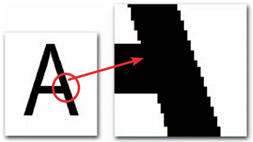
Aliasing The jaggy edges that appear in bitmap images with curves or lines at any angle other than multiples of 90 . The anti-aliasing function in Elements softens around the edges of images to help make the problem less noticeable. See Figure A.1.


Figure A.1: Aliasing is most noticeable on the edges of text and objects with diagonal or curving edges.

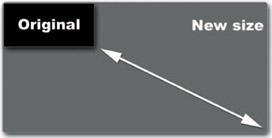
Aspect ratio This is usually found in dialog boxes concerned with changes of image size and refers to the relationship between width and height of a picture. The maintaining of an image's aspect ratio means that this relationship will remain the same even when the image is enlarged or reduced. See Figure A.2.


Figure A.2: Mantaining the aspect ratio of your photograph when you enlarge or reduce sizes will help guarantee that all your picture elements remain in proportion.

B >>

Background printing Is a printing method that allows the user to continue working whilst an image or document is being printed.

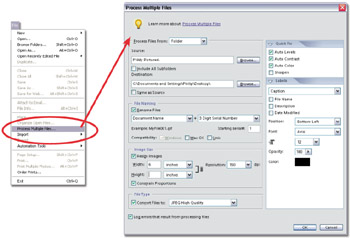
Batch processing or Process Multiple Files as it is known in Elements 3.0. Refers to a function or a series of commands being applied to several files at one time. This function is useful for making the same changes to a folder full of images. In Elements this function is found under the File menu and is useful for converting groups of image files from one format to another. See Figure A.3.


Figure A.3: The batch or Process Multiple...

UNLIMITED FREE
ACCESS
TO THE WORLD'S BEST IDEAS

SUBMIT
Already a GlobalSpec user? Log in.

This is embarrasing...

An error occurred while processing the form. Please try again in a few minutes.

Customize Your GlobalSpec Experience

Category: Image Processors
Finish!
Privacy Policy

This is embarrasing...

An error occurred while processing the form. Please try again in a few minutes.