Adobe Photoshop Elements 3.0: A Visual Introduction to Digital Imaging

Chapter 12: New Photo Creations

As we have already seen in previous chapters, Photoshop Elements 3.0 (Windows version) now combines much of the great technology that previously existed in the Photoshop Album product, with its own powerful image-editing structure. One standout feature of the marriage is the Photo Browser, another is the inclusion of the Photo Creations work space. Here at last is a common place to house a range of sophisticated imaging projects that enables users to quickly and easily produce and share their pictures in a range of project forms. A few years ago it would have been sufficient for a good image-editing package to include a print command and maybe a way to export pictures in a variety of different file formats, but these days photos are compiled, shared, distributed and displayed in a much broader range of ways. With the inclusion of the Photo Creation work space in Elements 3.0 you too can start to use your pictures in forms that you may never have thought possible.

The Photo Creation Projects

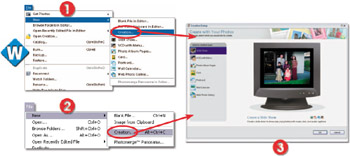
Photo Browser: File > New > Creation
Editor: File > New > Creation

The Photo Creation work space can be accessed from the Photo Browser and the Editing spaces by selecting the option from the File > New menu or the Create button in the shortcuts bar. In addition, browser users can also select each of the Creation projects individually from this menu. All these actions will take you to the main Photo Creations dialog. See Figure 12.1.


Figure...

UNLIMITED FREE
ACCESS
TO THE WORLD'S BEST IDEAS

SUBMIT
Already a GlobalSpec user? Log in.

This is embarrasing...

An error occurred while processing the form. Please try again in a few minutes.

Customize Your GlobalSpec Experience

Category: Digital Asset Management Software
Finish!
Privacy Policy

This is embarrasing...

An error occurred while processing the form. Please try again in a few minutes.