Adobe Photoshop Elements 3.0: A Visual Introduction to Digital Imaging

I started this book by applauding Adobe for their foresight in releasing Elements, because in doing so they had obviously realized the importance of a huge group of users who wanted the power of Photoshop but didn't need all the features. I hope that the last few chapters have demonstrated that for 95% of your digital imaging needs Elements should be your first port of call.
Most users will find that this package more than covers their entire image-editing requirements, but as you develop your skills and understanding some of you will arrive at a point where you need some of the sophisticated professional features contained in Photoshop. To help you decide when this day has arrived, this chapter will look at the differences between Elements and the Adobe image-editing flagship Photoshop.
From the outset it is important to understand that Photoshop is a professional imaging tool. In the current industry climate, this means that not only does the software contain 'bullet-proof' editing and enhancement features, but it also must allow users to output files that are customized for high-quality offset printing and web production. For this reason, Photoshop contains many features dealing with these areas.
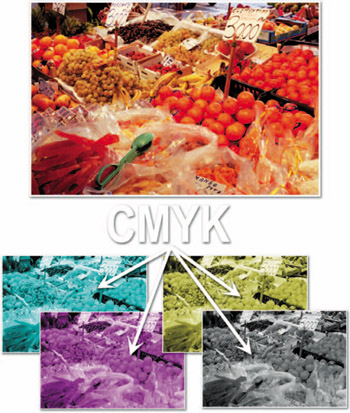
Although Elements is more than sufficient for making prints with most desktop inkjet machines, Photoshop can also create and edit images in the CMYK (Cyan, Magenta, Yellow and Black) press format. See Figure 14.1.