AutoCAD Pocket Reference: For Release 2006, 2005 and 2004
Section 3: Dimensioning

DIMENSIONING

True Associative

True Associative Dimensioning means that the dimensions are actually attached to the objects that they dimension. If you move the object, the dimension will move with it. If you scale or stretch the object, the dimension text value will change also. (Note: It is not parametric. This means, you cannot change the dimension text value and expect the object to change.)

True Associative Dimensioning can be set to ON, OFF or Exploded

I strongly suggest that you keep true associative dimensioning on. It is truly a very powerful feature and will make editing the objects and dimensions much easier.

On = Dimensions are truly associative. The dimensions are associated to the objects and will change if the object is changed. (Setting 2)

Off = Dimensions are non-associative. The dimensions are not associated to the objects and will not change if the object changes. (Setting 1)

Exploded = Dimensions are not associated to the objects and are totally separate objects (arrows, lines and text). (Setting 0)

How to turn Associative Dimensioning On or OFF

There are 2 methods:

Method 1.
On the command line type: dimassoc , then enter the number 2, 1 or 0 .

Method 2.
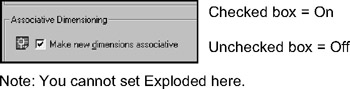
Select Tools / Options / User Preferences tab.

Note

You cannot set Exploded here.

The Default setting is "2" or "ON", but check to make sure.

When you first enter AutoCAD, the True Associative dimensioning feature is "ON". This setting is saved...

UNLIMITED FREE
ACCESS
TO THE WORLD'S BEST IDEAS

SUBMIT
Already a GlobalSpec user? Log in.

This is embarrasing...

An error occurred while processing the form. Please try again in a few minutes.

Customize Your GlobalSpec Experience

Category: Caps, Grips, and Closures
Finish!
Privacy Policy

This is embarrasing...

An error occurred while processing the form. Please try again in a few minutes.