AutoCAD Pocket Reference: For Release 2006, 2005 and 2004
ALIGNED DIMENSIONING

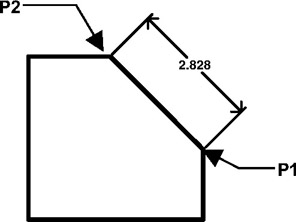
The ALIGNED dimension command aligns the dimension with the angle of the object that you are dimensioning. The process is the same as Linear dimensioning. It requires two extension line origins and placement of text location. (Example below)

  1. Select the ALIGNED command using one of the following:

    TYPE = DIMALIGNED or DIMALI or DAL
    PULLDOWN = DIMENSION / ALIGNED
    TOOLBAR = DIMENSION

    Command: _dimaligned

  2. Specify first extension line origin or

  3. Specify second extension line origin: select the second extension line origin (P2)

  4. Specify dimension line location or [Mtext/Text/Angle]: place dimension text location

    Dimension text = the dimension value will appear here

UNLIMITED FREE
ACCESS
TO THE WORLD'S BEST IDEAS

SUBMIT
Already a GlobalSpec user? Log in.

This is embarrasing...

An error occurred while processing the form. Please try again in a few minutes.

Customize Your GlobalSpec Experience

Category: Herringbone Gears
Finish!
Privacy Policy

This is embarrasing...

An error occurred while processing the form. Please try again in a few minutes.