AutoCAD Pocket Reference: For Release 2006, 2005 and 2004

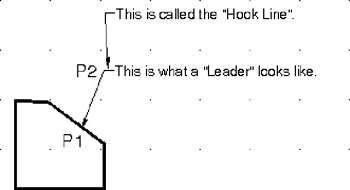
The LEADER command is primarily used to add a note to an object. A Leader's appearance is very similar to a Radial dimension but a Leader should not to be used for Radial dimensioning. A Leader allows you to type a note at the end of the hook. (Note: Leader and Qleader are the same command)
If associative dimensioning is turned on with DIMASSOC, the leader start point can be associated with a location on an object. If the object is relocated, the arrowhead remains attached to the object and the leader line stretches, but the text or feature control frame remains in place.
Select the LEADER command using one of the following.
TYPE = LE or QLEADER
PULLDOWN = DIMENSION / LEADER
TOOLBAR = DIMENSION
Command: _qleader
Specify first leader point, or [Settings]
Specify next point: select next location (P2)
Specify next point: select another point or press
Specify text width <.000>: press
Enter first line of annotation text
Enter next line of annotation text: type more text or press

The hook line is automatically added to the last line segment (P2) if the leader line is 15 degrees or more from horizontal. The length of the Hook Line is controlled by the arrow length setting in the dimension style.
If you would like...