AutoCAD Pocket Reference: For Release 2006, 2005 and 2004

The ANGULAR dimension command is used to create an angular dimension between two lines that form an angle. All that is necessary is the selection of the two lines and the location for the dimension text.
The degree symbol is automatically added as the dimension is created.
Select the ANGULAR command.
Command: _dimangular
Select arc, circle, line, or
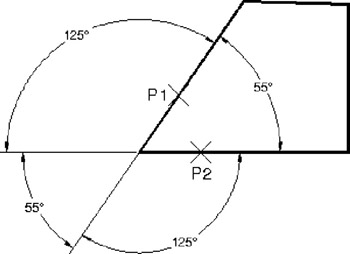
Select second line: click on the second line that forms the angle (P2)
Specify dimension arc line location or [Mtext/Text/Angle]: place dimension text location
Dimension text = angle will be displayed here
Any of the 4 angular dimensions shown below can be created by clicking on the 2 lines (P1 and P2) that form the angle.