AutoCAD Pocket Reference: For Release 2006, 2005 and 2004

CONTINUE DIMENSIONING

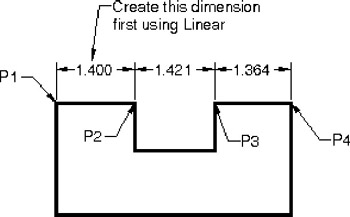
Continue creates a series of dimensions in-line from an existing dimension. If you use the continue dimensioning immediately after a Linear dimension, you do not have to specify the continue extension origin.

  1. Create a linear dimension first (1.400 P1 and P2).

  2. Select the Continue command using the icon or Dimension / Continue.
    Command: _dimcontinue

  3. Specify a second extension line origin or [Undo/Select]

    Dimension text = 1.421

  4. Specify a second extension line origin or [Undo/Select]

    Dimension text = 1.364

  5. Specify a second extension line origin or [Undo/Select]

UNLIMITED FREE
ACCESS
TO THE WORLD'S BEST IDEAS

SUBMIT
Already a GlobalSpec user? Log in.

This is embarrasing...

An error occurred while processing the form. Please try again in a few minutes.

Customize Your GlobalSpec Experience

Category: Extension Springs
Finish!
Privacy Policy

This is embarrasing...

An error occurred while processing the form. Please try again in a few minutes.