AutoCAD Pocket Reference: For Release 2006, 2005 and 2004
DIMENSIONING ARC LENGTHS VERSION 2006 ONLY

You may dimension the distance along an Arc. This is known as the Arc length. Arc length is an associative dimension.

Example:

Select the Arc length dimension command using one of the following:

TYPING = dimarc
PULLDOWNS = Dimension / Arc length
TOOLBARS =Dimension

Command: _dimarc
Select arc or polyline arc segment: select the Arc
Specify arc length dimension location, or [Mtext/Text/Angle/Partial/Leader]: place the dimension line and text location
Dimension text = dimension value will be shown here

To differentiate the Arc length dimensions from Linear or Angular dimensions, arc length dimensions display an arc ( ) symbol by default. (Also called a "hat" or "cap")

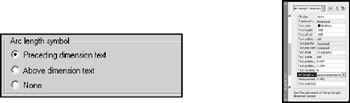
The arc symbol may be displayed either above, or preceding the dimension text. You may also choose not to display the arc symbol.

Example:

Specify the placement of the arc symbol in the Dimension Style / Symbols and Arrows tab or you may edit its position using the Properties Palette.

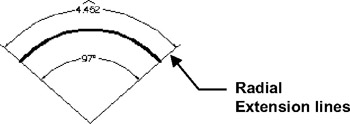
The extension lines of an Arc length dimension are displayed as radial if the included angle is greater than 90 degrees.

Example:

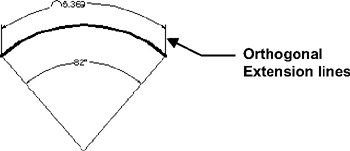
The extension lines of an Arc length dimension are displayed as orthogonal if the included angle is less than 90 degrees.

Example:

UNLIMITED FREE
ACCESS
TO THE WORLD'S BEST IDEAS

SUBMIT
Already a GlobalSpec user? Log in.

This is embarrasing...

An error occurred while processing the form. Please try again in a few minutes.

Customize Your GlobalSpec Experience

Category: Welding Gases and Thermal Process Gases
Finish!
Privacy Policy

This is embarrasing...

An error occurred while processing the form. Please try again in a few minutes.