Introduction to Simulink with Engineering Applicatioins, Second Edition
Chapter 3: The Continuous-Time Blocks Library

Overview

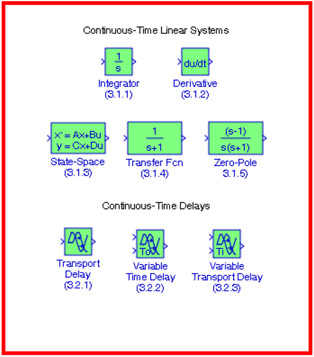
This chapter is an introduction to the Continuous-Time Blocks library. This is the second library in the Simulink group of libraries and contains the Continuous-Time Linear Systems Sub-Library, and the Continuous-Time Delays Sub-Library blocks shown below. We will describe the function of each block included, and their application will be illustrated with examples.

3.1 The Continuous-Time Linear Systems Sub-Library

The Continuous-Time Linear Systems Sub-Library contains the blocks described in Subsections 3.1.1 through 3.1.5 below.

3.1.1 The Integrator Block

The Integrator block is described in Section 2.14, Chapter 2, Page 2 22.

3.1.2 The Derivative Block

The Derivative block approximates the derivative of its input. The initial output for the block is zero. The accuracy of the results depends on the size of the time steps taken in the simulation. Smaller steps allow a smoother and more accurate output curve from this block. Unlike blocks that have continuous states, the solver does not take smaller steps when the input changes rapidly. Let us consider the following simple example.

Example 3.1

We will create a model that will compute and display the waveform of the derivative of the function y = cos x.

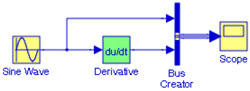
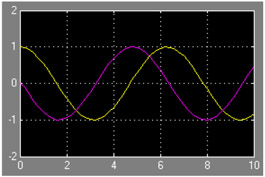
The model is shown in Figure 3.1, and the input and output waveforms are shown in Figure 3.2.


Figure 3.1: Model for Example 3.1


Figure 3.2: Input and output waveforms for the model of Figure 3.1

To convert the sine function in the Sine Wave block to a cosine function, in the Source...

UNLIMITED FREE
ACCESS
TO THE WORLD'S BEST IDEAS

SUBMIT
Already a GlobalSpec user? Log in.

This is embarrasing...

An error occurred while processing the form. Please try again in a few minutes.

Customize Your GlobalSpec Experience

Category: Power Supplies
Finish!
Privacy Policy

This is embarrasing...

An error occurred while processing the form. Please try again in a few minutes.