Introduction to Simulink with Engineering Applicatioins, Second Edition

The Digital Filter Design block is included in the Simulink Signal Processing Blockset [16] and requires the installation of the Simulink program to create models related to digital filter design applications. The functionality of this block can be observed by dragging this block into a model and double-clicking it. When this is done, the Block Parameters dialog box appears as shown in Figure 20.90.
As indicated on the left lower part of this box, we can choose the Response Type (Low-Pass, High-Pass, Band-Pass, or Band-Elimination), the Design Method (IIR or FIR) where an IIR filter can be Butterworth, Chebyshev Type I, Chebyshev Type II, or Elliptic, and FIR can be Window, Maximally Flat, etc., and the Window [17] can be Kaiser, Hamming, etc. We must click on the Design Filter button at the bottom of the Block Parameters dialog box to update the specifications. Example 20.4 below is very similar to that of Example 11.23, Page 11 68.
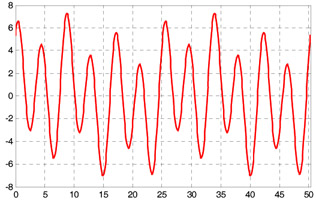
The signal represented by the waveform of Figure 20.91 is the summation of the sinusoidal signals x, y, and z defined in the MATLAB script below.
t=0:pi/32:16*pi; x=sin(0.25.*t); y=2.*sin(0.75.*t+pi/6); z=5.*sin(1.5.*t+pi/3); plot(t,x+y+z); grid
During transmission of this signal from its source to its destination, this signal is corrupted by the addition of unwanted Gaussian random noise. In this example, we will...