Introduction to Simulink with Engineering Applicatioins, Second Edition
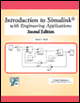
This chapter is an introduction to the Sinks library. This is the thirteenth library in the Simulink group of libraries and consists of three sub-libraries, the Model & Subsystem Outputs Sub-Library, the Data Viewers Sub-Library, and the Simulation Control Sub-Library blocks shown below. Their functions are illustrated with examples.

The Models and Subsystems Outputs Sub-Library contains the blocks described in Subsections 14.1.1 through 14.1.4 below.

The Outport block creates an external output or an output port for a subsystem. This block is described in Section 2.1, Chapter 2.

The Terminator block can be used to cap blocks whose output ports are not connected to other blocks. If we run a simulation with blocks having unconnected output ports, Simulink issues warning messages. We use Terminator blocks to cap those blocks to avoid warning messages. This block is described in Section 2.3, Chapter 2.

The To File block writes its input to a matrix in a MAT-file. The block writes one column for each time step: the first row is the simulation time; the remainder of the column is the input data, one data point for each element in the input vector.
open matrixCToFile.mat
ans = ans: [4x51 double]
Next, at the MATLAB command prompt we type
whos
and MATLAB outputs
Name ...