Introduction to Simulink with Engineering Applicatioins, Second Edition
This chapter is an introduction to the Model-Wide Utilities library. This is the ninth library in the Simulink group of libraries and contains the Linearization of Running Models Sub-Library, the Documentation Sub-Library, and the Modeling Guides Sub-Library. Their functions are illustrated with examples.

The Linearization of Running Models Sub-Library contains the blocks described in Subsections 10.1.1 and 10.1.2 below.

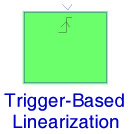
The Trigger-Based Linearization block, when triggered, invokes the MATLAB functions linmod or dlinmod to create a linear model for the system. No trimming [1] is performed. The linear model is stored in the base workspace as a structure, along with information about the operating point at which the snapshot was taken. Multiple snapshots are appended to form an array of structures.
The name of the structure used to save the snapshots is the name of the model appended by_Trigger_Based_Linearization, for example, vdp_Trigger_Based_Linearization. The structure has the fields shown in the Help menu for this block.
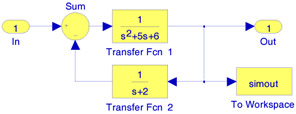
We will use a Trigger-Based Linearization block to extract the linear model for the model shown in Figure 10.1.
This is the same model as that in Figure 3.4, Example 3.3, Chapter 3, Page 3 5, where with the execution of the command [A, B, C, D]=linmod('Figure_3_4') the linear model in the form of the state-space MATLAB displayed the four matrices as
A = ...