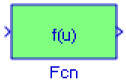
16.1 The Fcn Block
The Fcn block applies a specified expression to its input denoted as u. If u is a vector, u(i) represents the ith element of the vector; u(1) or u alone represents the first element. The specified expression can consist of numeric constants, arithmetic operators, relational operators, logical operators, and the math functions abs, acos, asin, atan, atan2, ceil, cos, cosh, exp, tabs, floor, hypot, In, log, log10, pow, power, rem, sgn, sin, sinh, sqrt, tan, and tanh.
Example 16.1 It can be shown that the solution [1] of the differential equation
| (16.1) | 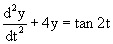
|
is
| (16.2) | 
|
where the constants k 1 and k 2 can be evaluated from the initial conditions. Then we can compute and display any value of y by specifying t, k 1, and k 2, using the model shown in Figure 16.1.
 Figure 16.1: Model for Example 16.1
 For the model or figure 16.1 the values are assigned as u(1) = t = ?/6, u(2) = k 1 = -1, u(3) = k 2 = -3, where at the MATLAB command prompt we enter:
u(1)=pi/6; u(2)=-1; u(3)=-3;y=-(1/4)*cos(2*u(1))*log(sec(2*u(1))+tan(2*u(1)))+<i class="emphasis"><span class="unicode">?</span></i>(2)*cos(2*u(1))+<i class="emphasis"><span class="unicode">?</span></i>(3)*cos(2*u(1));
The Simulink documentation includes the Modeling Engine Timing Using Triggered Subsystems demo. It...

 TABLE OF CONTENTS