20.9 Discrete Time Integration with Variable Amplitude Input
In Chapter 2, Exercise 12, we showed that when the input signal is a pulse, a Discrete Forward Euler Integrator and a Discrete Trapezoidal Integrator will produce the same result. In this example, we will use an input that varies in amplitude during a sample period. This is illustrated with the model in Figure 20.87.
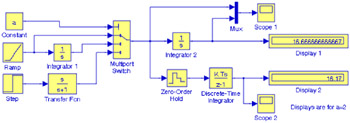 Figure 20.87: Model for Discrete Time Integration with variable amplitude input
 For the model in Figure 20.71, we have used the following settings:
Simulation Configuration Parameters
Solver: Ode4 (Runge-Kutta)
Type: Fixed Step Size
Fixed Step Size: 0.01
Start Time: 0
Stop Time: 10
Ramp block
Slope: 0.1
Step block
Final Value: 5
Transfer Function block
Numerator: [1 0]
Denominator: [1 1]
Multiport Switch block
Number of inputs: 3
Zero Order Hold block
Sample time: 0.2
Discrete Time Integrator block
Integrator method: User's choice
Sample time: -1 (Inherent from input)
Display 1 and Display 2 blocks
Format: Long
In MATLAB command prompt enter:
a = 1 for testing a discrete integrator with a ramp input signal
a = 2 for testing a discrete integrator with a parabolic input signal - chosen for this model
a = 3 for testing a discrete integrator with an exponentially decaying signal
All other unlisted parameters are left in their default states
Upon execution of the simulation command, the waveforms displayed by the Scope 1 and Scope 2 blocks are shown in Figures 20.72 and...

 TABLE OF CONTENTS