Introduction to Simulink with Engineering Applicatioins, Second Edition
This chapter is an introduction to the Math Operations Library. This is the seventh library in the Simulink group of libraries and contains and contains the Math Operations Group Sub-Library, the Vector / Matrix Operations Group Sub-Library, and the Complex Vector Conversions Group Sub-Library. Their functions are illustrated with examples.

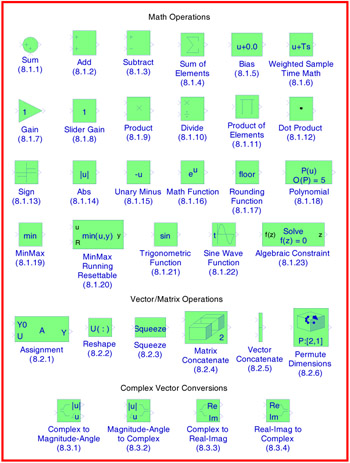
The Math Operations Group Sub-Library contains the blocks described in Subsections 8.1.1 through 8.1.23 below.

The Sum block is an implementation of the Add block which is described in Section 8.1.2 below. We can choose the icon shape (round or rectangular) of the block on the Block Parameters dialog box.

The Add block performs addition or subtraction on its inputs. This block can add or subtract scalar, vector, or matrix inputs. It can also collapse the elements of a single input vector. We specify the operations of the block with the List of Signs parameter. Plus (+), minus (-), and spacer () characters indicate the operations to be performed on the inputs. The spacer character creates extra space between ports on the block's icon.
If there are two or more inputs, then the number of characters must equal the number of inputs. For example, " + - +" requires three inputs and configures the block to subtract the second (middle) input from the first (top) input, and then add the third (bottom) input.