Phase-Locked Loops: Design, Simulation, and Applications, Fifth Edition

The program distributed with the book can also be used to design and simulate ADPLLs. The procedures are similar to those described in Chap. 5 and are best explained by a quick tour.
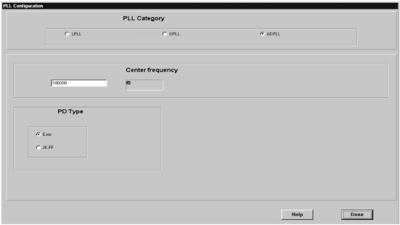
Start the program and hit the CONFIG speedbutton in the taskbar. This brings up the configuration dialog box, Fig. 7.1. In the panel PLL Category, click the ADPLL radiobutton. To configure an ADPLL, it is required only to specify the center frequency f0 and the type of phase detector, Exor or JK- FF. Hit the Done button to complete the dialog.
Next click the DESIGN speedbutton in the taskbar. This activates the design dialog box, Fig. 7.2. In the top-most panel (Configuration) the actual ADPLL configuration is displayed. Below there are two panels, labeled Frequencyb params and ADPLL params. The ADPLL params are represented by the parameters K, M, and N as described in Sec. 6.3. For the last-specified values for K, M, and N, the program computes the corresponding ADPLL hold range ? f H and 3-dB corner frequency f 3dB. As in case of the mixed-signal PLL, the user can proceed in two ways: (1) Enter the desired hold range into the edit window labeled fH and then hit the Calc ADPLL params button. The program then computes the parameters K, M, and N