AutoCAD 2009 Essentials

By solving all of the workshops included that complete small projects from concept through actual plotting, this guide will help you simulate the creation of a real life project from beginning to end.
 TABLE OF CONTENTS
 AutoCAD was one of the first CAD (Computer Aided Design/Drafting) software applications to come on the market.
The first version of AutoCAD was released at the end of 1982, and it was designed to be used only on PCs. Since then AutoCAD use has increased dramatically on a global scale.
Users can draw both 2D drawings and 3D designs in AutoCAD. There is another version of AutoCAD, called AutoCAD LT, which is for 2D drafting only.
In this book we will cover AutoCAD 2009.
There are two ways to start AutoCAD 2009:
| AutoCAD 2009 | While installing AutoCAD 2009, the program will create a shortcut on your desktop. To start AutoCAD you can simply double-click this icon. |
From the Windows taskbar click Start/All Programs/Autodesk/AutoCAD 2009/AutoCAD 2009.
AutoCAD will start with a new drawing file opened, which will look like the following:

AutoCAD 2009 has "almost" the same interface as Microsoft Office 2007.
You will use the Menu Browser instead of the usual pull-down menus.
You will use Ribbons instead of toolbars.
The new interface gives you more space in the Graphical Area, which is your drawing area.
Click on the Menu Browser, and you will see the following:
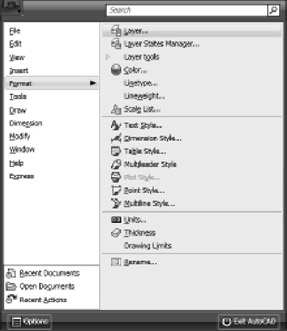
You will see all the menus as well as all the submenus. You don't need to click to see the submenus; whenever you stop over one menu, the submenu appears automatically.
At the bottom of the