AutoCAD 2009 Essentials

By solving all of the workshops included that complete small projects from concept through actual plotting, this guide will help you simulate the creation of a real life project from beginning to end.
 TABLE OF CONTENTS
 There are lots of things you need to think about while setting up your drawing file. Of course we can't cover them all in this chapter, but we will mention the most important things.
As a first step define the drawing distance and angle units, along with their precision.
Try to figure out what size (area) workspace will be sufficient to accommodate your drawing.
Layers are an effective way to organize your drawings so we will learn what they are, how to create them, and how to control them.
| Note | In Appendix A we will discuss how to create templates in AutoCAD, which are more applicable for establishments than for individuals. |
From the Menu Browser select Format/Units. The following dialog box will appear:
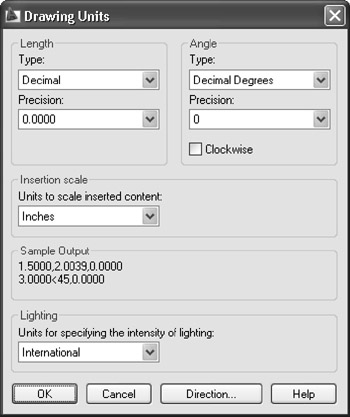
Under Length, set up the desired Type. You will have five choices:
Architectural (example: 1 -5 3/16 )
Decimal (example: 20.4708)
Engineering (example: 1 -4.9877 )
Fractional (example: 17 1/16)
Scientific (example: 1.6531E+01)
Under Angle, set up the desired Type. Again, you will have five choices:
Decimal Degrees (example: 45.5)
Deg/Min/Sec (example: 45d30 30 )
Grads (example: 50.6g)
Radians (example: 0.8r)
Surveyor's Units (example: N 45d30 30 E)
For the desired Length and Angle select the Precision, for example:
Architectural precision can be 0 -0 1/16, 0 -0 1/32, etc.
Decimal precision can be 0.00, 0.000, etc.
Deg/Min/Sec precision can be 0d00 00, 0d00 00.0, etc.
By default AutoCAD deals with the positive...