AutoCAD 2009 Essentials
By solving all of the workshops included that complete small projects from concept through actual plotting, this guide will help you simulate the creation of a real life project from beginning to end.
 TABLE OF CONTENTS
 Dimensioning in AutoCAD is a semi-automatic process; the user will contribute part of the job and AutoCAD will do the rest.
The user (in linear dimensioning, for instance) will specify three points. The first and the second is the length to be dimensioned, and the third is the position of the dimension line.
Accordingly, AutoCAD will automatically generate the Dimension block, just like in the following illustration:
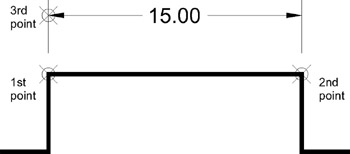
A Dimension block consists of four parts. They are:
Dimension line
Extension lines
Arrowheads
Dimension text
See the following illustration:

The Dimensioning process has two phases:
Creating Dimension style(s)
Putting dimensions over your drawing
The Dimension style will control the appearance of the Dimension block, so each establishment will set up the style according to their standards.
Creating a dimension style is a lengthy and tedious job, but it will only be done once, allowing the user to focus on the other job, putting the dimensions over the drawing.