AutoCAD 2009 Essentials

By solving all of the workshops included that complete small projects from concept through actual plotting, this guide will help you simulate the creation of a real life project from beginning to end.
 TABLE OF CONTENTS
 Click the Alternate Units tab and you will see the following:
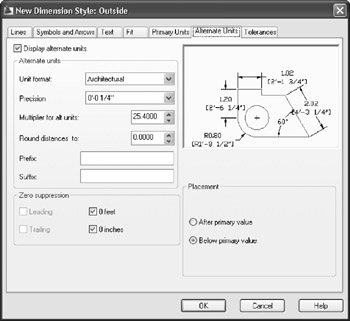
If you want two numbers to appear for each dimension, click on Display alternate units.
Specify the Alternate Unit format, its Precision, the Multiplier for all units' value, the Round distance, the Prefix, the Suffix, and the Zero suppression criteria.
Specify whether to show the alternate units After primary value or Below primary value.