Designing Menus with Encore DVD

Learn to create great looking, functional menus using Encore DVD 1.5 with this insider's guide. To help you design better menus, this book explains all the facets of DVD menu design.
 TABLE OF CONTENTS
 A timeline is a "container" for assembling video, audio, and subtitles into a single DVD-Video disc. In the timeline, you set the language code for audio and subtitle tracks, and you add chapter points in the video track. Timelines are internal to the Encore DVD project file and are not saved externally. The maximum number of timelines in a Encore DVD project is 99.
Timelines appear in the Project and Timelines tabs. When a timeline is opened for editing, it appears in a Timeline window. When multiple timelines are open in the same window, they appear as separate tabs. A tab can be torn off to create a new Timeline window, or it can be dragged into the tab area of another Timeline window to be docked within it.
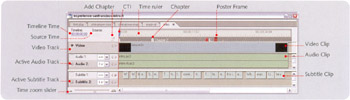
Although Encore DVD's timeline window might look a like a nonlinear editor (NLE), it is not an NLE it has crude editing functions and is limited to one video and audio clip per track, and timelines cannot be nested. Also, note that the multiple tracks do not equate to a multitrack editor. Each track represents a single audio source that may be stereo or surround sound. Use an NLE for sophisticated edits and for combining more than one video clip into a single file to be imported into Encore DVD.
Multiple still images are, however, allowed in a video track.
The timeline's editing timebase is 29.97 frames per second...