Designing Menus with Encore DVD

Learn to create great looking, functional menus using Encore DVD 1.5 with this insider's guide. To help you design better menus, this book explains all the facets of DVD menu design.
 TABLE OF CONTENTS
 The Menu Editor is for designing menus, previewing subpicture highlights, and linking and routing buttons. Encore DVD uses the Photoshop file format for menus. This means all your layers are imported and you are free to move layers and edit text. The Menu Editor window works in conjunction with the Properties palette for setting links and with the Layers, Library and Tool palettes.
The Encore DVD Menu Editor can contain one or more menus simultaneously. Like the After Effects Composition window, it uses tabs to organize multiple menus within the window. The active tab appears brighter than the inactive tabs and is drawn on top. The active tab is closed by clicking the Close button,  . Tabs can be dragged outside of the current Menu Editor window to create a new window and can be dragged into another window to conserve space. If you have many menus open in one window, the tab scroll bar becomes available. (Figure 6-17)
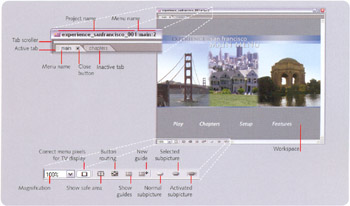
At the bottom of the Menu Editor window are several options for viewing a menu. There are controls for enlarging the display, showing safe area guides, routing buttons, and previewing button highlight states. Figure 6-17 on page 140 shows this area. Descriptions of the controls follow.
This drop down box sets the magnification level for the current menu. The zoom level presets range from 25 to 400 percent. Custom zoom levels can be...