Designing Menus with Encore DVD

Learn to create great looking, functional menus using Encore DVD 1.5 with this insider's guide. To help you design better menus, this book explains all the facets of DVD menu design.
 TABLE OF CONTENTS
 Encore DVD has a Layers palette for inspecting, hiding and locking layers and for converting layers to buttons. It resembles the Photoshop Layers palette but is a little different (Figure 4-8).
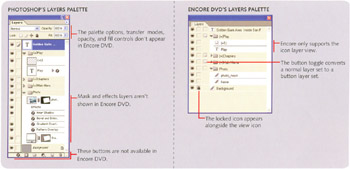
The Layers palette in Encore DVD unfortunately does not support direct manipulation of layer order like the Photoshop Layers palette. This means you cannot pick up a layer with the cursor and drag it to a new location in the palette. Instead, you have to use the keyboard shortcuts to move layers and layer sets.
| FUNCTION | MENU COMMAND & SHORTCUT |
|---|---|
| Move layer to the top of a layer set, or a layer set to the top of the stacking order. |
|
| Move layer up one level within a layer set, or a layer set up one level in the stacking order. |
|
| Move layer down one level within a layer set, or a layer set down one level in the stacking order. |
|
| Move layer to the bottom of a layer set, or a layer set to the bottom of the stacking order. |
|