Designing Menus with Encore DVD

Learn to create great looking, functional menus using Encore DVD 1.5 with this insider's guide. To help you design better menus, this book explains all the facets of DVD menu design.
 TABLE OF CONTENTS
 Developing a DVD requires several stages: acquisition, editing, menu design, linking, compression, quality assurance, usability testing, and replication. This book is about menu design with Adobe Encore DVD. You will learn how to create functional, aesthetically pleasing menus.
Menu design is a crucial part of the DVD authoring process because menus are the interface between viewers and the content stored on the DVD.
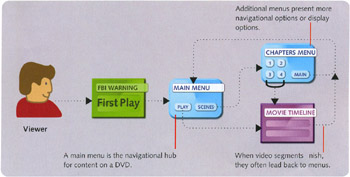
To help you design better menus, this book explains all the facets of DVD menu design. The book is organized into four sections: Introduction, Designing for the Screen, Creating Still Menus, and Creating Motion Menus. A set of appendices, a glossary, and an index round out the book's offering.
You're reading Chapter One, which gives you an overview of the book, tips on how to use the book, and hardware and software prerequisites.
Chapter Two discusses the DVD specification as it relates to menus. It covers the structure of a menu and the differences between still and motion menus, NTSC and PAL video formats, and normal and wide screen aspect ratios. I include a descriptive list of the different types of menus you can create for projects at the end of the chapter.
Chapter Three explains interaction design for DVD menus. It includes strategies for gathering requirements, mapping interactions, and testing prototypes. If you're new to interface design, you'll want to read...